ReviewTab
A journal peer-review workspace that lets reviewers use a language model without sending manuscripts to services that keep them. What it does, downloads, and how to start.
A review workspace for reviewers
ReviewTab is a review workspace for journal peer review. Open a manuscript and work through it with an argument diagram, section review, citation checks and your own notes. Opening, reading and taking notes need no model. A model task runs only after it shows its scope and you approve it. The interface is in Korean and English.
It is developed and distributed free of charge by Junhewk Kim, who runs this course. This page is the developer's description, not an independent evaluation.
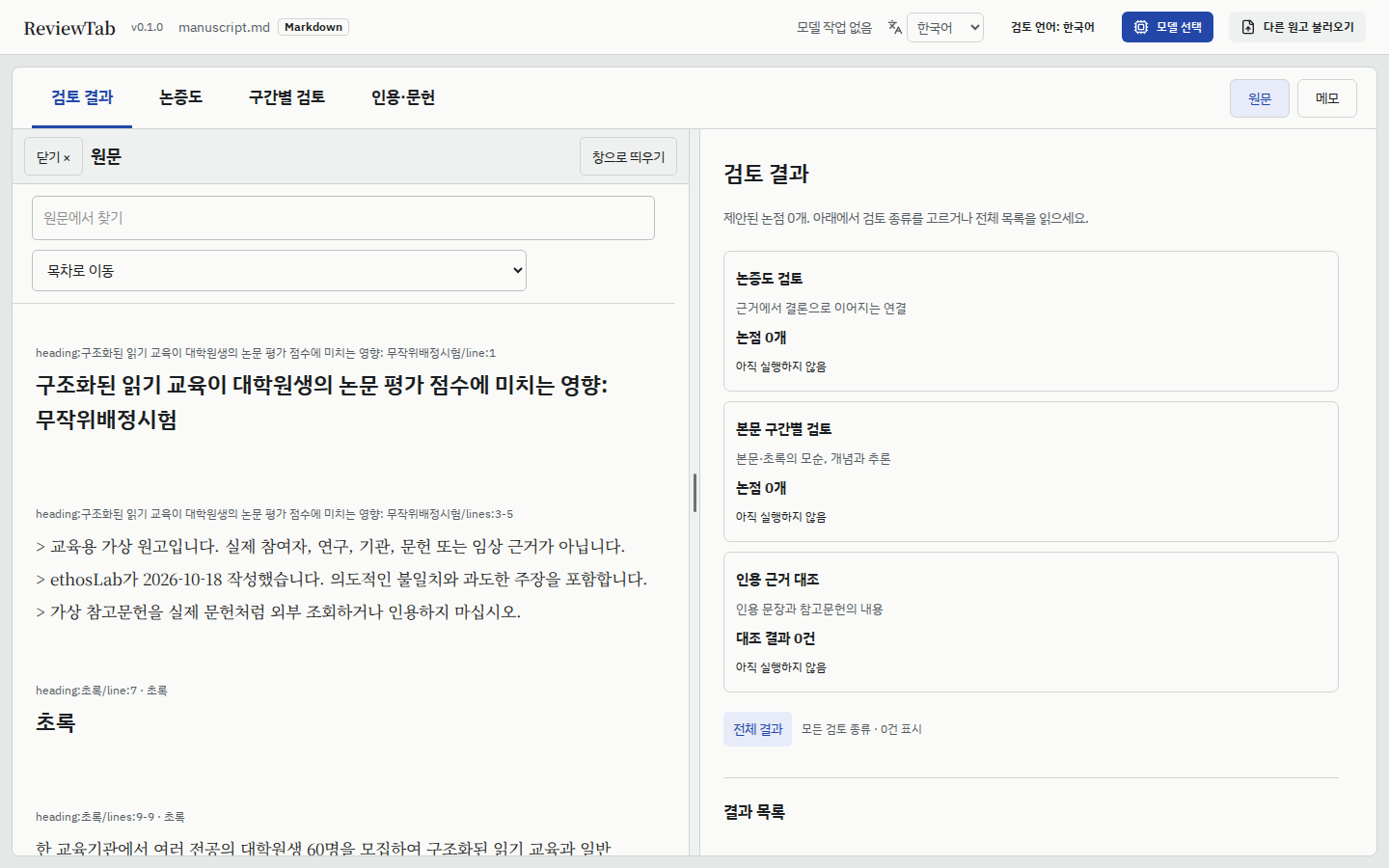
Right after opening a manuscript. The source stays open beside the current view. No model task has run yet. (Korean interface.)
출처 · ReviewTab 0.1.0 linux-x64 public build, 2026-10-30. The manuscript is this course's fictional teaching manuscript.
그림을 누르면 원본 크기로 볼 수 있습니다.
| View | What it is for |
|---|---|
| Review results | Progress of the argument diagram review, section review and citation comparison, with the issues they propose |
| Argument diagram | The links from evidence to conclusions, shown as a diagram you can edit |
| Section review | Contradictions between body and abstract, concepts and reasoning, section by section |
| Citations | Citing sentences and the cited references, side by side |
| Source and notes | The manuscript beside any view; private notes kept apart from the comments you include in the review |
Included comments are exported as a Markdown file with their source quotations. Export needs no model.
The reviewer decides
ReviewTab proposes; it does not decide. It does not recommend acceptance or rejection. Its suggestions can be wrong, incomplete or misleading, and so can its checks of quotations, citations and arithmetic. Compare each suggestion with the manuscript before you adopt it. Every judgement in a review you submit is yours.
Where does the manuscript go?
- Manuscripts are read on your computer. Only the part an approved task needs is sent to the model you chose.
- Models can only be ones on your computer or a private network, or OpenRouter with zero data retention (ZDR). Other services are refused.
- Reference lookups go to scholarly databases only when you approve them.
- Nothing is sent to the author: no usage data and no manuscript content.
- Browser extensions allowed to read all sites (translators, grammar checkers, AI assistants) can also read the manuscript on the page. A browser or profile without them is advised.
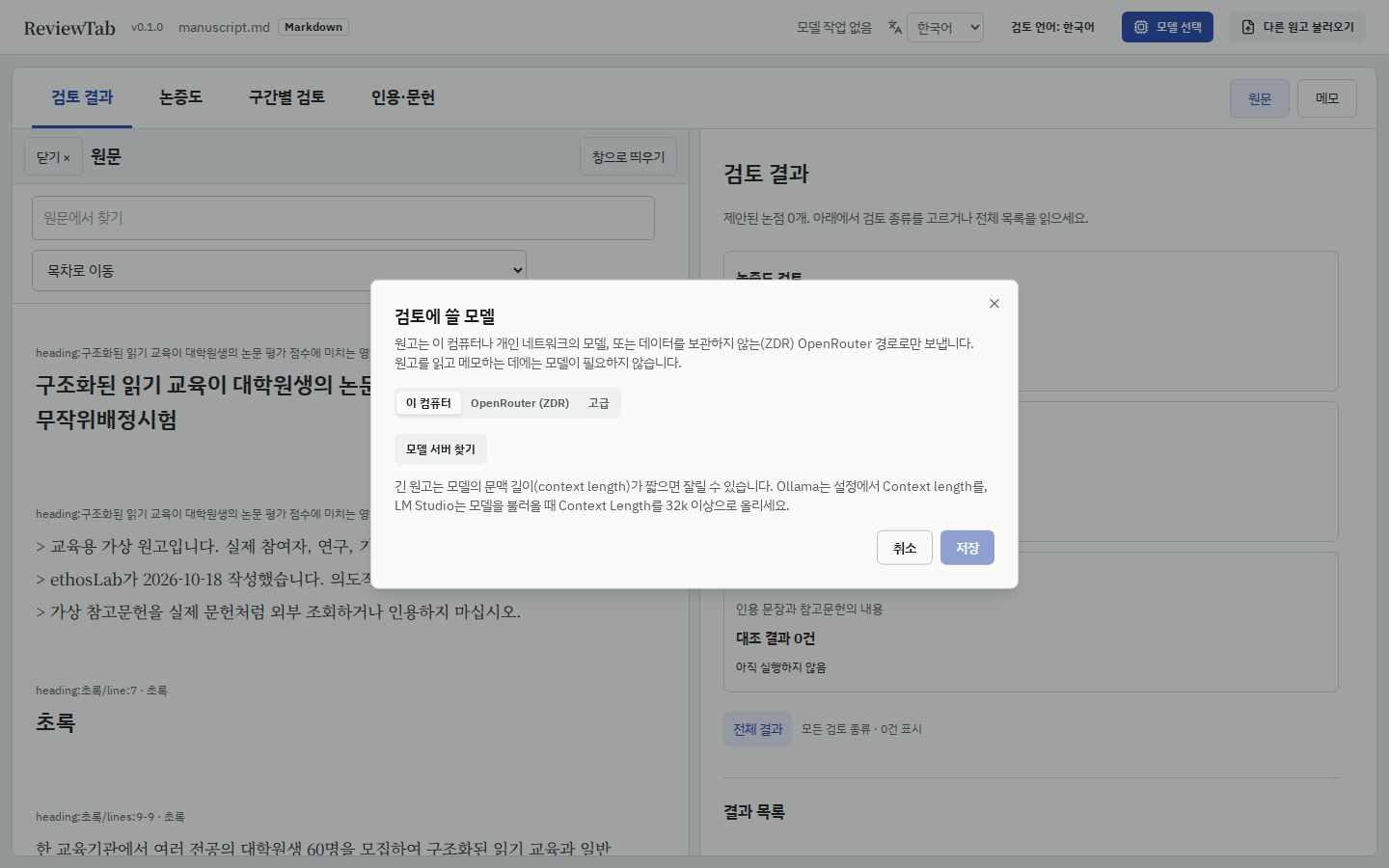
The model button in the header offers only these three routes. (Korean interface.)
출처 · ReviewTab 0.1.0 linux-x64 public build, 2026-10-30.
그림을 누르면 원본 크기로 볼 수 있습니다.
Download
The current version is 0.1.0 (released 2026-10-30). Download the one file for your system.
| System | File | Size |
|---|---|---|
| Windows 10/11 (x64) | reviewtab-0.1.0-windows-x64.zip | 103 MB |
| macOS 11 or later (Apple silicon) | reviewtab-0.1.0-macos-arm64.tar.gz | 107 MB |
| Linux (x64, glibc 2.28 or later) | reviewtab-0.1.0-linux-x64.tar.gz | 121 MB |
There is no build for Intel Macs. New versions and their changes appear first on the releases page. Use only a copy from the links on this page, the author's releases page, or the author in person.
Check a download
Save SHA256SUMS in the same folder as the download and compare. Linux and macOS should print OK. On Windows, compare the printed value with the matching line in SHA256SUMS.
sha256sum -c SHA256SUMS --ignore-missing          # Linux
shasum -a 256 -c SHA256SUMS --ignore-missing      # macOS
certutil -hashfile reviewtab-0.1.0-windows-x64.zip SHA256   # Windows
Start
Unpack the archive into any folder. It includes the Node.js and Python it needs, so nothing else has to be installed.
| System | Start |
|---|---|
| Windows | Double-click ReviewTab.bat. If Windows says it protected your PC, choose More info > Run anyway |
| macOS | Double-click ReviewTab.command. If blocked, choose Open Anyway in System Settings > Privacy & Security |
| Linux | In a terminal, go to the unpacked folder and run ./reviewtab.sh |
The Windows build is not yet code-signed, which is why Windows shows that warning. The macOS build is signed and notarized by Apple.
ReviewTab opens in your browser (usually http://127.0.0.1:8765/). Keep the start window open while you work and close it to quit. Closing only the browser tab leaves ReviewTab running; running the start file again reopens it.
On the first screen, choose a manuscript file: PDF, DOCX, DOC, HWP, HWPX, Markdown or text, up to 20 MiB. Opening a file does not run a model. Choose the model with the model button in the header (모델 선택 in the Korean interface shown above). A model with a short context length can cut off a long manuscript; the app advises raising Ollama's and LM Studio's context length to 32k or more.
Your reviews and updates
Reviews are kept apart from the app folder.
| System | Location |
|---|---|
| Windows | %LOCALAPPDATA%\ReviewTab |
| macOS | ~/Library/Application Support/ReviewTab |
| Linux | ~/.local/share/reviewtab |
To update, unpack the new version into a new folder; your reviews carry over. To remove ReviewTab, delete the app folder. To remove your reviews too, delete the location above.
Known limits of 0.1.0
- Builds do not yet carry a signed file list, so the app does not check its own files.
- Ollama and LM Studio are detected but not tested. llama.cpp servers and OpenRouter ZDR models are.
- English model output has been tested live on the argument-diagram task only.
- The Windows build is not code-signed.
Not the same program as closed-review
The course's optional peer-review lessons cover closed-review, a public plugin used inside Hermes and installed from a terminal. ReviewTab grew out of closed-review but is a separate app that runs in the browser without Hermes. The installation commands in the closed-review lessons do not apply to ReviewTab.
Licence
ReviewTab is free to use under its own licence, which does not allow modification, redistribution, reverse engineering or providing it as a service to others. The source code is not published. Read the full licence before installing. The open-source components it includes, and their licences, are listed in THIRD_PARTY_NOTICES.txt in the archive.
As of October 2026